
Colada Local Field Notes / 01
Why Is Your Durham Clinic Hard to Find on Google?
Five checks for dentists, doctors and naturopaths before spending more on marketing.
You search for the care your clinic provides, add your town, and see other practices. Yours is missing. Does that mean you need a new website? More blog posts? Ads?
Not necessarily. First, work out what is missing: your Google business listing, a page on your website, or a prominent position in one particular search. Each points to a different next step.
Whether your practice is in Newcastle, Bowmanville or elsewhere in Durham Region, Ontario, start here.
01 Which part of Google are you looking at?
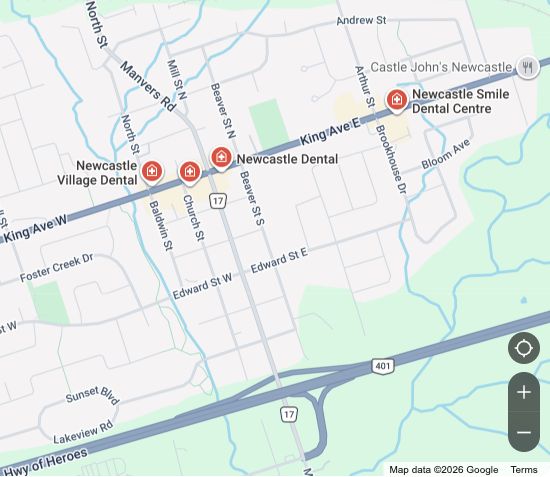
The map with nearby businesses and the links to individual websites are different parts of the results. Your clinic might appear in one without standing out in the other.
The map: where the practices are
The website link: a page title and short description

Try this: save the exact search, a screenshot, the date and the town you searched from. Note whether you mean the map or the website links. That is much more useful than "we aren't on Google."
02 Would the listing get someone to the right place?
Open your public listing and check the details a new patient would rely on:
- The practice name matches your real-world name.
- The address and map pin point to the correct location.
- The phone number reaches the right practice.
- The website link opens the right clinic page on your phone.
- Any hours displayed, including temporary changes, are accurate.
Found an old number or a link to the wrong branch? Start there. Google's profile-editing guide explains corrections. If you can't manage the listing or see a verification prompt, resolve access first rather than creating another profile.
Appointment-only practice? Google's rules say businesses operating only by appointment should not provide hours. Check the hours guidance before changing yours.
03 Does Google have the right kind of clinic?
In the settings for your Google listing, called your Business Profile, check the main business category. It should describe what the practice actually is, not every service you would like to appear for.
Resist adding "Newcastle dentist" or a string of Durham towns to your business name unless that is genuinely its name. Google's business guidelines require an accurate real-world name.
Found a separate listing for a practitioner? Don't delete it on instinct. Individual practitioners have their own eligibility rules; establish who and what the listing represents first.
04 Does your website say what you do, and where?
Open one important service page. Could someone unfamiliar with your clinic quickly understand the care offered, the actual location and how to enquire?
"Care built around you."
"Naturopathic care in Bowmanville."
A place name alone won't do the job. Explain the service, who provides it and what someone needs to know before contacting you. Google's SEO Starter Guide recommends useful, readable content that considers the words people search for. You don't need to repeat every variation.
05 Where were you when you searched?
A result seen in Whitby is not a reliable stand-in for what someone in Newcastle sees. Google uses location information when returning results. Check the location shown near the bottom of the results page; a private browsing window doesn't make location disappear.
Fix the problem you can name.
Correct an obvious detail first. If the basics look right, the next step is a closer look at the listing and the website separately, not automatically buying more content or ads.
That's how we'd approach help with local search visibility at Colada. Send us the public listing and the search that puzzled you. It's a useful place to start the conversation, without committing to a bigger project before you know what's wrong.

Let's talk
local.
Bring your questions. Let's find the next step.
